
Xcode Cloud · build activity
Monitor Xcode Cloud build status, recent activity, and project attention.
Tazuki helps you review recent Xcode Cloud build activity with the project context, failure details, duration, and history that make a status meaningful.
See how Tazuki fitsDirect answer
Follow builds as a review workflow, not a notification promise.
Tazuki synchronizes the Xcode Cloud data available through App Store Connect and gives build status a focused home on your Mac. You can track recent activity, open failures, and move into longer history without calling the workflow real-time monitoring.
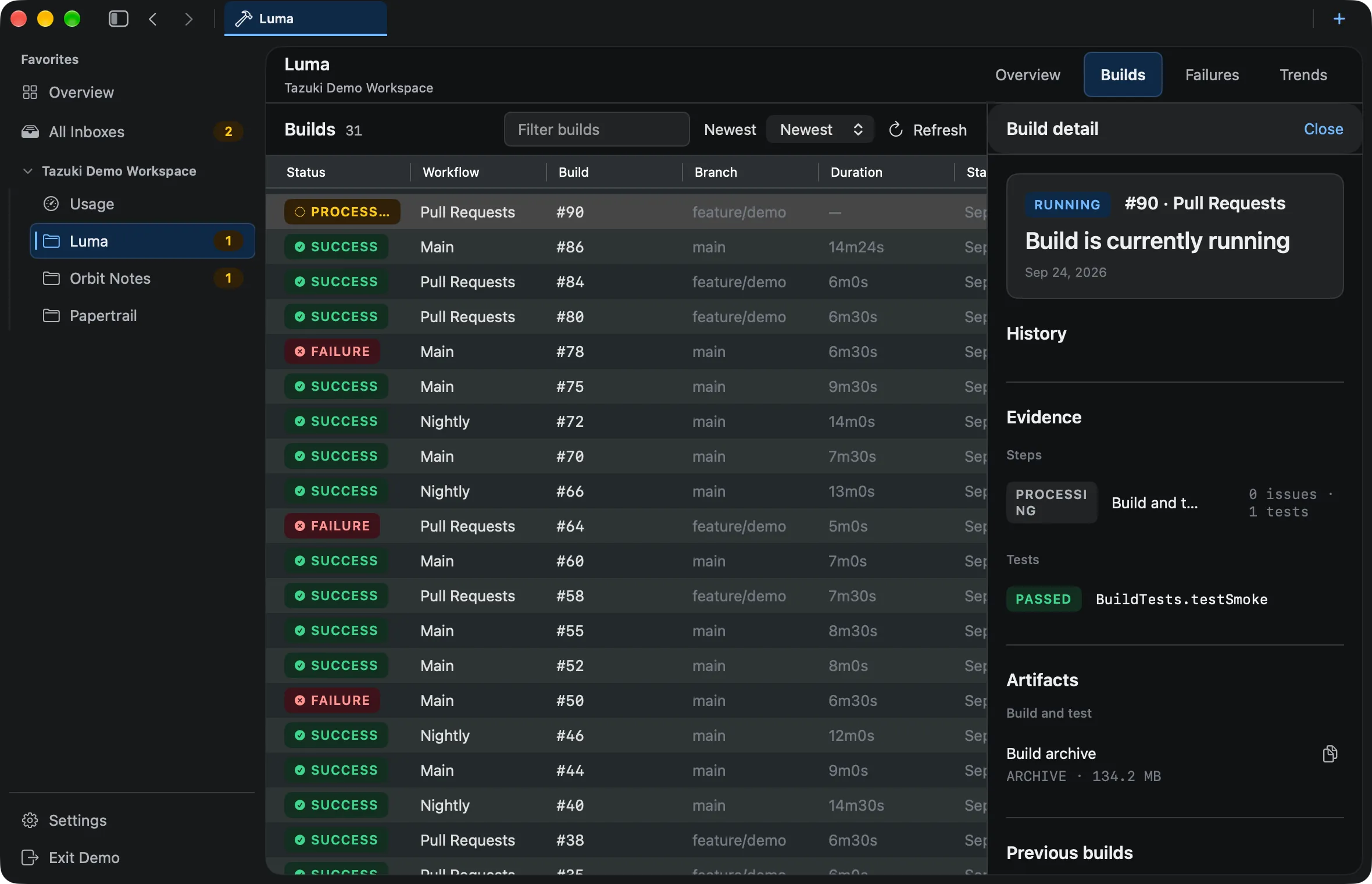
Project overview
See current Xcode Cloud project status in one workspace.
Tazuki keeps project Overview context, recent activity, failures, tests, and trends close together so the latest result is a starting point rather than the whole story.
- Project Overview
- Current failures and tests
- Recent activity and trends
Current builds
Track recent builds, workflows, branches, and duration.
Build status is easier to review when workflow, branch, duration, and project identity stay visible together. Tazuki keeps recent builds readable without implying live monitoring.
- Build status and duration
- Workflow and branch context
- Recent build activity
Project attention
Start with the incidents and project issues that need attention.
The Tazuki Inbox gathers cross-project attention, active incidents, and resolved incidents. Inbox is a Tazuki product concept, not an Apple feature name, and each item can lead to Build, Failure, or Test context.
- Cross-project attention
- Active and resolved incidents
- Build, Failure, and Test navigation
History
Move from current activity into history and detail.
Follow a current signal into synchronized build history, failures, test results, or analytics when the project needs more context than a status list can provide.
- Xcode Cloud build history
- Failures and test results
- Analytics and trend context
A useful boundary
Monitoring here means following and reviewing.
The word monitor can suggest push alerts or live observability. Tazuki’s current role is more precise: synchronize available data, show recent build activity, and help you review the context around it.
- No claim of real-time monitoring
- No push alerts or notification promise
- No automatic repair of failed builds
Questions, answered
Before you add another view to your workflow.
How can I track Xcode Cloud build status on Mac?
Tazuki synchronizes Xcode Cloud build data through App Store Connect and presents recent builds, status, workflow, branch, duration, and related project context in its Mac workspace.
Can Tazuki be used as an Xcode Cloud dashboard?
Yes. Tazuki provides a focused Mac workspace for project status, recent builds, failures, tests, duration, trends, and attention signals.
What does the Tazuki Inbox show?
The Inbox is a Tazuki product view for cross-project attention, including active and resolved incidents and paths into related builds, failures, and tests.
What is an Xcode Cloud incident in Tazuki?
An incident is a Tazuki attention signal derived from synchronized delivery history, such as a build, failure, or test condition worth reviewing. It is not an Apple email or notification feature.
Can Tazuki show multiple project contexts?
Yes. Tazuki can keep attention and recent activity from multiple project contexts visible while preserving each project’s identity and synchronized details.
Does Tazuki provide real-time push alerts?
No. Tazuki organizes synchronized attention and recent build activity; it makes no real-time push-alert promise.
Tazuki · macOS 14+
Keep the next useful signal close.
Tazuki is available on the Mac App Store. Download it free and unlock remote synchronization with Pro.
Download on the Mac App Store