
Xcode Cloud · build history
Review Xcode Cloud build history and inspect the details behind each run.
Tazuki helps you move from the latest build result to the sequence around it: outcomes, durations, failures, tests, and the project context that makes history useful.
See how Tazuki fitsDirect answer
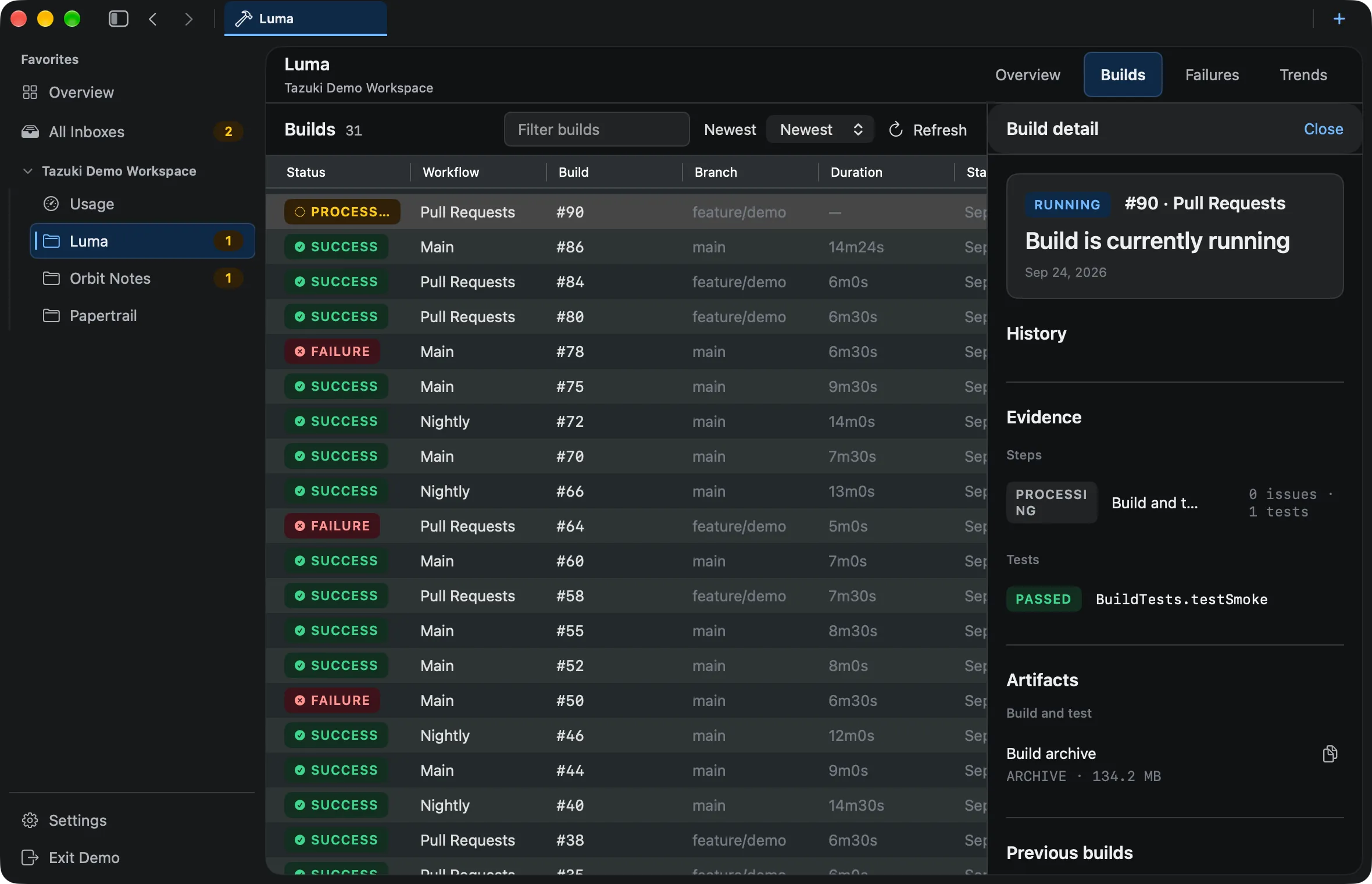
A local view of the Xcode Cloud history Tazuki can synchronize.
Tazuki uses App Store Connect as its source, then stores normalized facts locally so you can review synchronized runs over time. The product is careful about the boundary: available history is not the same thing as unlimited or permanently recoverable history.
Across runs
Review past Xcode Cloud builds as a run history.
One build tells you what happened once. A run of builds can show whether the outcome is unusual, whether duration is moving, or whether a failure has appeared before. Tazuki makes that sequence easier to inspect.
- Past builds and previous runs
- Status and duration
- Project and workflow context
One build
Open one build to inspect its result and evidence.
Build Details keeps one run’s status, conclusion, steps, actions, issues, tests, and raw details together so a result can be investigated without losing its history context.
- Status and conclusion
- Steps, actions, and issues
- Tests and raw details
Attached context
Keep tests and artifacts attached to the run that produced them.
When provider records are available, Tazuki keeps test results and artifacts connected to the build and step that produced them. Artifact downloads remain on the dedicated artifacts page.
- Test results
- Build artifacts
- Build relationship and source context
Previous context
Compare one run with previous builds.
The current build is easier to interpret when previous builds remain visible. History gives the focused detail view a sequence instead of an isolated result.
- Previous-build context
- History around the current run
- Sequence versus isolated result
A useful boundary
History depends on what can be synchronized.
Tazuki does not claim to retrieve data that Apple no longer makes available, and it does not promise unlimited history from the first install. The useful record is the record the connection can obtain and the app can store locally.
- No unlimited-history promise
- No guaranteed recovery of deleted or expired source data
- No claim that first install includes every historical run
Questions, answered
Before you add another view to your workflow.
How can I view past Xcode Cloud builds on my Mac?
Tazuki synchronizes the Xcode Cloud build data available through App Store Connect and keeps those synchronized runs in a local Mac workspace for reviewing previous outcomes, duration, failures, tests, and project context.
What can I inspect inside an Xcode Cloud build?
Build Detail keeps a synchronized run’s status, conclusion, steps, actions, issues, tests, artifacts, raw details, and previous-build context together when those records are available.
What is the difference between build history and build details?
Build History helps compare multiple runs, while Build Details focuses on the status, evidence, steps, issues, tests, artifacts, and context inside one run.
Can Tazuki recover every old Xcode Cloud build?
No. Tazuki can work with the data available through App Store Connect and synchronize it while the source makes it available. It does not promise recovery of unavailable history.
Where is synchronized build history stored?
Tazuki stores normalized delivery facts and local analysis in SQLite on your Mac after synchronization.
Does Tazuki run or rerun builds?
No. Tazuki presents synchronized build information; Xcode Cloud remains the system that runs the build.
Tazuki · macOS 14+
Keep the next useful signal close.
Tazuki is available on the Mac App Store. Download it free and unlock remote synchronization with Pro.
Download on the Mac App Store