
Xcode Cloud · failure context
Understand Xcode Cloud build failures and recurring error patterns.
Tazuki helps you look across failed builds for repeated failure details, project context, and the history that separates a recurring signal from a one-off result.
See how Tazuki fitsDirect answer
Organize failure signals so recurring problems are easier to recognize.
A failed build is an event; a repeated failure is a pattern worth understanding. Tazuki connects failure details to synchronized build history and project context, while leaving diagnosis and repair decisions with the developer.
Failure context
Start with the failed build, error, or issue.
Failure details are more useful when they can be read beside the build, workflow, project, and recent runs that surround them. Tazuki keeps that context together instead of reducing every failure to a status label.
- Failed build outcomes
- Errors, issues, and evidence
- Project and workflow context
Recurring signals
Separate one-off failures from recurring patterns.
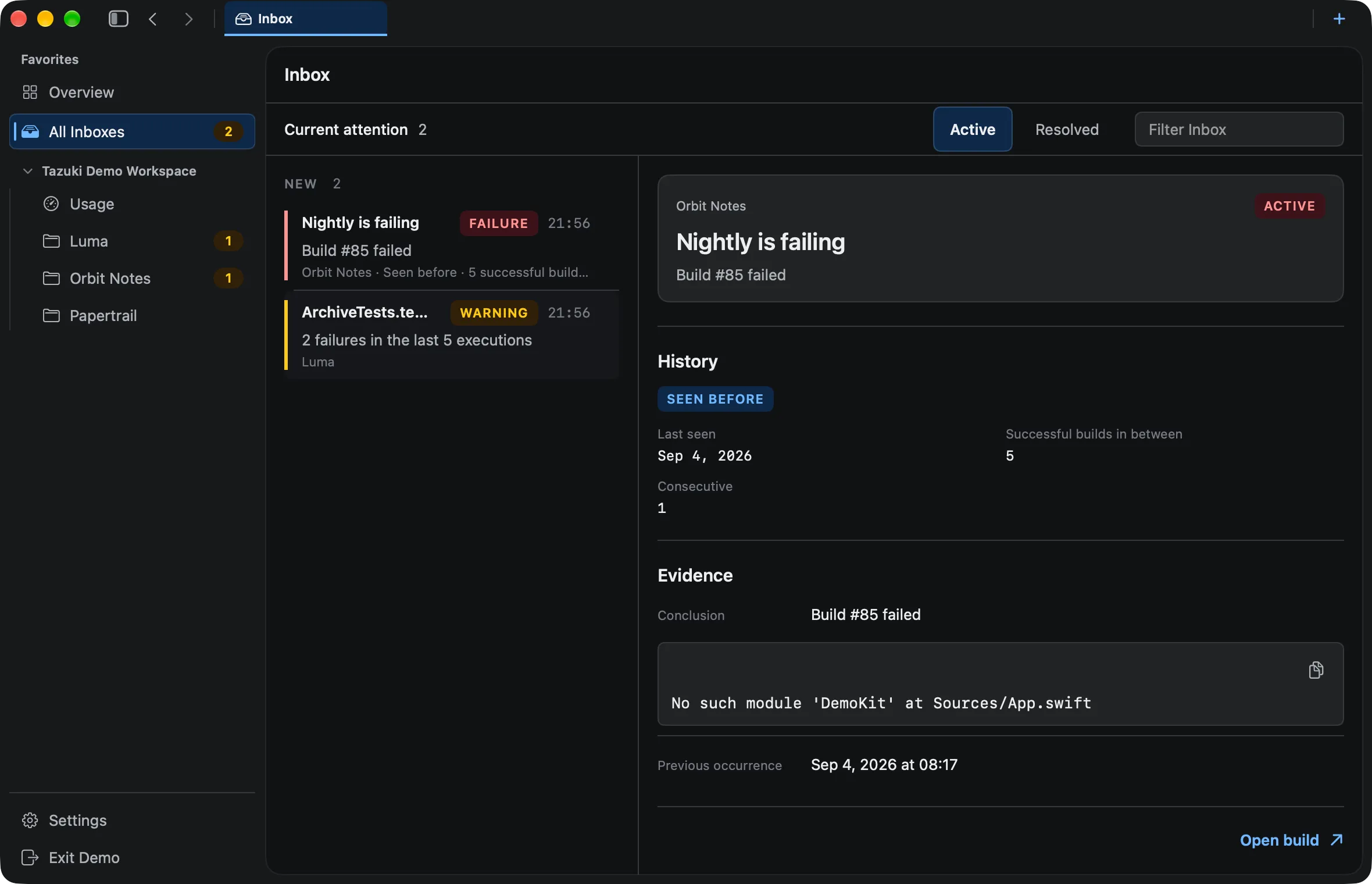
Repeated error details, previous occurrences, and multiple-build context can reveal a recurring pattern. That does not make the cause automatic; it makes the history easier to bring into the next debugging conversation.
- Repeated error details
- Previous occurrences
- Multiple-build recurrence
Fingerprint
Use failure fingerprints to recognize the same signal again.
A fingerprint is a normalized recurrence signal. It helps recognize compatible failure evidence across builds, but it is not root-cause diagnosis and does not determine the correct fix.
- Normalized recurrence signal
- Failure fingerprint identity
- No automatic root-cause analysis
Follow the pattern
Follow recurring failures through build history.
A recurring failure can lead into build history, test results, and analytics so the signal is read beside the delivery movement around it.
- Build history context
- Test results nearby
- Analytics and trend movement
A useful boundary
Understanding signals is not automatic diagnosis.
Tazuki can help organize and recognize failure patterns. It does not promise AI root-cause analysis, automatic fixes, or a complete explanation of every Xcode Cloud error.
- No automatic root-cause analysis
- No automatic Xcode or CI repair
- No promise that every failure can be grouped or explained
Questions, answered
Before you add another view to your workflow.
Why did my Xcode Cloud build fail?
The specific cause has to be determined from the evidence produced by the build. Tazuki helps organize failed builds, issues, related evidence, history, and recurring signals so you can see whether the failure is isolated or part of a pattern.
Why does the same Xcode Cloud error keep appearing?
Repeated error details may indicate a recurring failure pattern. Tazuki can normalize compatible failure evidence into fingerprints so previous occurrences are easier to recognize, but recurrence alone does not prove the root cause.
What is a failure fingerprint in Tazuki?
A failure fingerprint is a normalized recurrence signal that helps recognize repeated failure details across synchronized builds.
Does a failure fingerprint prove the root cause?
No. A fingerprint helps identify recurrence and collect context; it does not prove the root cause or replace developer investigation.
Can every failure be grouped into a fingerprint?
No. Grouping depends on the failure details and history available through synchronization. Tazuki does not promise that every error can be normalized.
Can Tazuki automatically fix a failed build?
No. Tazuki organizes failure details and recurring signals so developers can understand them; it does not automatically repair Xcode or CI configuration errors.
Tazuki · macOS 14+
Keep the next useful signal close.
Tazuki is available on the Mac App Store. Download it free and unlock remote synchronization with Pro.
Download on the Mac App Store